
How employees opt in to HR text messages
Who receives these texts
Only our own employees and managers, and only about their own time-off requests and schedule: a confirmation that a request was received, the decision on it, approval requests and reminders for managers, and short scheduling notices. No marketing. Nobody is texted without opting in first.
Opt-in method 1 — the employee enters their own number (web form)
On our BPE HQ site (hr.opebybde.net, access-code protected, employees only), the time-off request form has an optional "Text me updates at (cell)" field. The person types their mobile number and ticks the consent box. The box and the disclosure printed directly under it read, word for word:
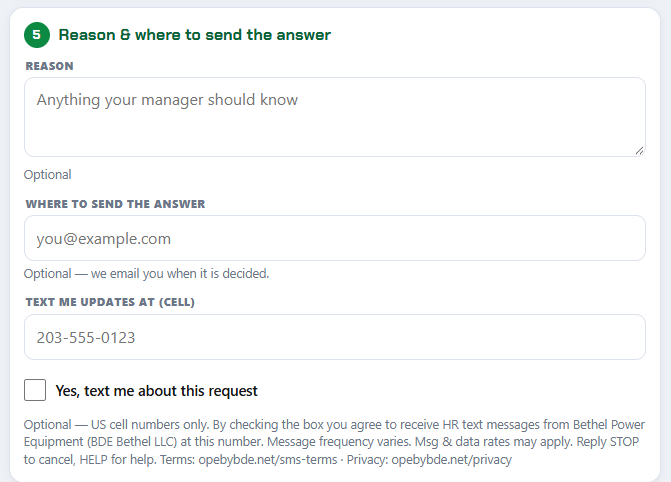
After submitting, the person sees a confirmation on screen ("We'll text you at (•••) •••-0123") and receives their first text:
Opt-in method 2 — a manager records the number, the employee confirms by text
A store manager can enter an employee's cell on the roster and set "Text me" to Yes. Nothing is sent except one confirmation request, and the number stays inactive until the employee replies:

Opt-in method 3 — texting START
An employee can text START to our BPE HQ texting number at any time to opt in (or back in after a STOP).
Opting out and help
Every message can be answered with STOP (one confirmation text, then nothing further) or HELP. Opt-outs are recorded immediately and respected by every part of the system, including reminders and queued messages. Consent to texts is never a condition of employment or of any purchase.
Contact
BDE Bethel LLC (doing business as Bethel Power Equipment)
Registered address: 83 Cross Hwy, Redding, CT 06896
Store / contact address: 6 Francis J Clarke Circle, Bethel, CT 06801
(203) 748-2933 · hr.opebybde.net